You meant to check one thing. A friend sent a TikTok, you watched it, and then the feed did what feeds do. It's now 12:31 AM and your alarm is set for 6:45.
This page is about that 44 minutes. Not about deleting TikTok, and not about willpower at midnight, which is the worst possible time to need it. It's about making the decision at 7 PM, when you're rested, and letting the phone hold it for you later.
How do you block TikTok at night on iPhone?
You have three options. TikTok's own Sleep reminders nudge you but can be dismissed with one tap. Apple's Screen Time can schedule Downtime for TikTok. An app blocker such as FocusPass shields TikTok during a nightly Focus Zone and, if you take a short Pass, relocks it automatically.
Decide at 7 PM. Let the phone keep the promise at midnight.
Three nights, three ways to stop
Here is the same 11:47 PM moment played out with each option. The details come from each tool's own settings and documentation, checked in November 2026.
Night 1 · TikTok's Sleep remindersInside TikTok, go to Profile, then the menu, then Settings and privacy > Screen time > Sleep reminders. At your chosen time TikTok mutes its notifications and shows a prompt to wind down. According to Neowin's walkthrough of TikTok's screen time tools, you can dismiss it with OK or snooze it for 10 minutes. That's the weak spot: the reminder lives inside the app you're trying to leave, and you leave it with a single tap.
For under-16 accounts TikTok goes further. In March 2025 it added a full-screen "wind down" takeover after 10 PM, with a second, harder-to-dismiss prompt if the teen keeps scrolling, as Social Media Today reported on 11 March 2025. Adults don't get that by default.
Night 2 · Apple Screen Time DowntimeApple's Screen Time lets you schedule a nightly window when only the apps you allow are available. It's built in and free. On your own phone without a Screen Time passcode, the limit screen offers to ignore it, and at 11:47 PM most of us take that offer. With a passcode someone else holds, it becomes a hard wall, which is the right tool for a child and an awkward one for an adult who sometimes truly needs a message.
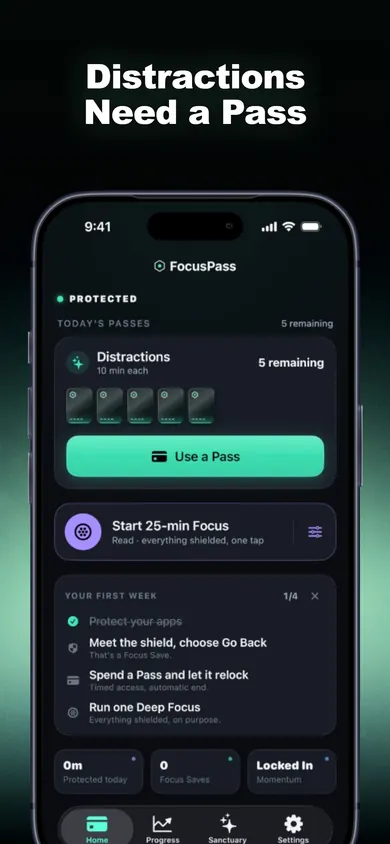
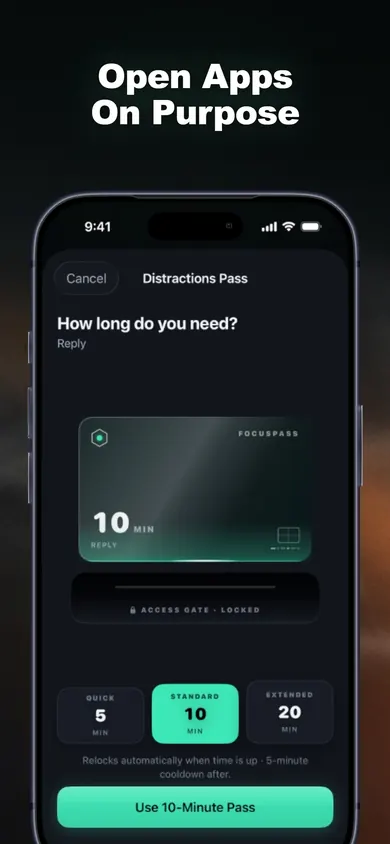
Night 3 · A FocusPass Sleep ZoneYou open TikTok and see a native shield: PROTECTED. You chose to protect this app. Two buttons. Go back, or Use a Pass for 5, 10 or 15 minutes, with an optional note like "Reply". If you take the Pass, the relock is scheduled with iOS before TikTok even opens, so it locks again on time even if FocusPass is closed. If you go back, FocusPass records one Focus Save. That's the whole mechanic you tried above.
A one-tap reminder asks you to stop. A Pass asks you to choose, and then keeps time for you.
Compare the three ways to block TikTok at night
| Option | What stops you | How easy to skip | Cost |
|---|---|---|---|
| TikTok Sleep reminders | A prompt inside TikTok | One tap (OK or snooze) | Free |
| Screen Time Downtime | Apple's limit screen | Easy without a passcode; hard wall with one | Free, built in |
| FocusPass Sleep Zone | A shield with Go back or a timed Pass | You can take a Pass, but it relocks on its own | Free plan includes one Focus Zone |
Table checked 3 November 2026 against TikTok's in-app settings as described by Neowin, Apple's Screen Time support page, and the FocusPass App Store listing.
Set up a TikTok Sleep Zone in 3 steps
- Pick TikTok with Apple's picker. FocusPass uses Apple's own Screen Time picker, so you can choose TikTok alone, the whole Social category, or websites too. Apple keeps your selection opaque, even to FocusPass.
- Make a Focus Zone for Sleep. Focus Zones are protected hours for Work, Study, Evening or Sleep. The free plan includes one, which is enough for a nightly TikTok block. Add your alarm and messages as Essentials so they stay reachable.
- Meet the shield at night. Go back and get a Focus Save, or take a short Pass for something real. An optional Reset Window stops one Pass from turning into three.
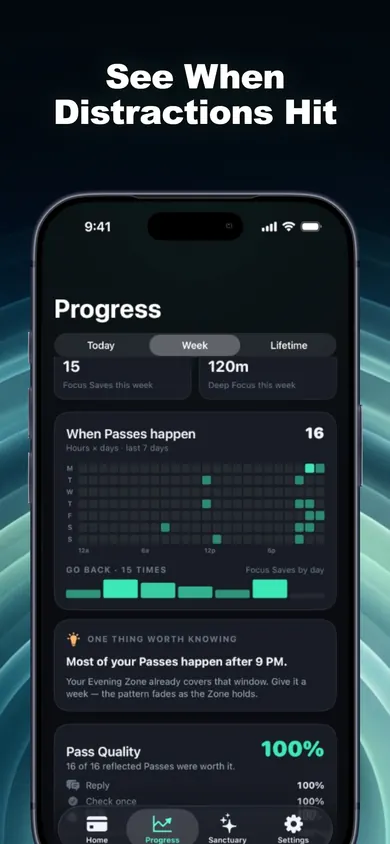
After a week or two, the Pass heatmap shows when you actually reach for your apps. When there's enough data, FocusPass may point out one pattern, like "Most of your Passes happen after 9 PM", and suggest an Evening Zone you can accept or ignore. Insights are calculated on your device.
What the TikTok shield looks like
Honest limits
- You can always turn it off. Turn Off All Protection always works and is never locked behind a purchase or streak. That's a design decision: FocusPass is a tool you choose, not a lock someone puts on you.
- It doesn't cover TikTok in a browser unless you add it. Add TikTok's website in the picker too, or the web version stays open.
- Sleep is bigger than one app. The CDC says adults 18 to 60 need 7 or more hours of sleep a night. Blocking TikTok gives that time back; it doesn't fix insomnia. This is general information, not medical advice. Talk to your clinician if sleep stays hard.
- It needs iOS 18 or later. Blocking happens on your iPhone; the Apple Watch app shows status only.
Who should pick something else
- Parents of a teen. Use TikTok's Family Pairing or Apple's Screen Time through Family Sharing with a passcode you hold. If a parent manages Screen Time, those settings come first over FocusPass anyway.
- Anyone who wants a lock they can't undo. FocusPass will always let you turn protection off.
- Android users. FocusPass is iPhone and iPad only.
If you want a wall someone else holds the key to, use Screen Time. If you want a door you choose to keep closed, use a Pass.
Tonight, TikTok gets a door.And it closes itself.
Start on your iPhone. No account, no ads, and your rules stay on your device.