Focus and Screen TimeUpdated November 2026
Finals season

For Students Who StudyNext to Their Phone

A free finals-week planner for iPhone. Scratch the pass to see tonight's one change.

Tonight: one 45-minute block, apps shielded.Then a 10-minute Pass as the reward, not as the break in the middle.
Download on the App StoreFree on iPhone
Free planner

Your finals study block plan

Three choices. The plan updates as you change them.

0minutes of shielded study before the exam

Green: learn, then self-test. Purple: self-test only. Yellow: exam day.

How do you block apps while studying on iPhone?

Shield the apps before you sit down, not after the first slip. On iPhone, that means Apple's Screen Time, a Focus, or an app built on Screen Time such as FocusPass. Set protected hours over your study window, start one fixed-length session for your hardest topic, and save any scrolling for a timed reward afterwards.

Decide once, before the session. Then you don't have to keep deciding.

Does your phone on the desk hurt studying?

Maybe less than you've heard. A widely shared 2017 study from the University of Texas (nearly 800 participants) found people did better with their phones in another room. But a pre-registered replication published in Acta Psychologica in 2022 found no difference by phone location. So we don't promise magic from a drawer. What the planner leans on instead is better established: a 2013 review in Psychological Science in the Public Interest rated practice testing and spreading study over time as the highest-utility techniques, ahead of rereading and highlighting.

Self-test, spread it out, and keep the feed shut while you do.

Study apps blocked: what the plan sets up

  • A Study Focus Zone over your weakest hours. Passes can't start during a zone, and one zone is included free.
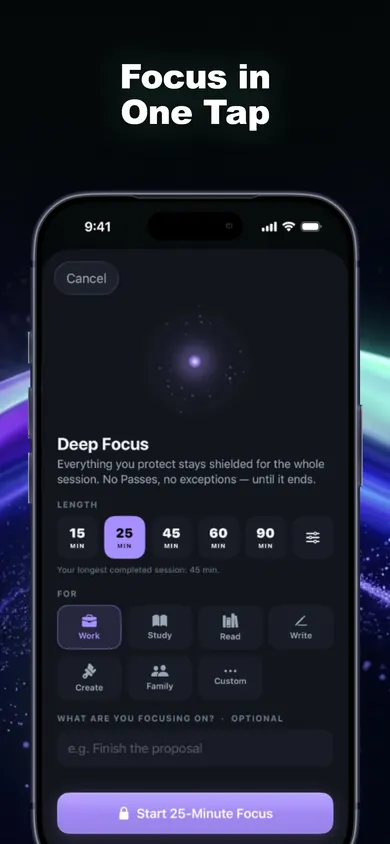
  • One Deep Focus session (25, 45, 60 or 90 minutes) for the hardest topic. The free plan includes one a day.
  • Essentials stay open: your school portal, calculator or messages from family.
Honest limits

What this plan can't do for you

It can be switched off

We made one deliberate choice: Turn Off All Protection always works in FocusPass, and it's never locked behind a purchase or streak. If you need a lock you can't undo during finals, use a stricter tool.

The free plan has caps

One Deep Focus session a day, one Wallet and one Focus Zone. Unlimited Deep Focus and more zones are part of FocusPass Pro, an optional subscription.

It's phone-only

FocusPass blocks on iPhone and iPad (iOS 18 or later). It does nothing on your laptop, which is where a lot of study-time drifting actually happens.

A blocker removes one distraction. It doesn't do the studying.

A worked example

Five days before a biology final

FocusPass Deep Focus screen with 15, 25, 45, 60 and 90 minute options and a Study label

Here's how we'd plan it for a hypothetical student with two free hours each evening, who loses the evening to short videos.

  1. Setup, 5 minutes: protect the video and social apps with Apple's Screen Time picker. Add a Study Focus Zone from 6 to 10 PM. Keep the school portal as an Essential.
  2. Each evening: start a 25-minute Deep Focus session labeled Study for the hardest unit, then keep going in 25-minute blocks with 5-minute breaks while the zone keeps the apps shielded.
  3. Every block ends with self-testing: close the notes and write what you remember, then check.
  4. At 10 PM: the zone ends. One 10-minute Pass, and the app relocks on its own.
  5. Exam eve: self-test only, then sleep. The CDC recommends 7 or more hours for adults, and 8 to 10 for teens.

Same two hours as before. The feed just doesn't get a vote during them.

Pick something else if

Who should pick something else

Focus mode vs Screen Time vs FocusPass for studying

Built in

Focus

Silences notifications and can hide Home Screen pages. Apps still open with one tap.

Built in

Screen Time Downtime

Blocks all but allowed apps on a schedule. On your own phone, it's easy to tap past unless a passcode is set.

Ours

FocusPass

A shield with Go Back or a timed Pass, Study zones, and Deep Focus sessions. Each Go Back is counted as a Focus Save.

Focus quiets the phone. Downtime closes it. FocusPass makes you choose.

Finals week

Shield the apps.Then open the notes.

Try it tonight. FocusPass is free on iPhone and iPad, with no account and no ads.

Download on the App StoreFree on iPhone

More from Focus and Screen Time