One sec vs Opal: what's the real difference?
One sec slows you down; Opal locks you out. One sec shows a short breathing pause each time you open a chosen app, then lets you decide. Opal blocks apps on schedules and limits, and its Deep Focus mode cannot be cancelled or bypassed. Pick by how you slip: on autopilot, or on purpose.
A pause fixes the reflex. A wall fixes the willpower gap. Neither fixes both.
We compared both apps from their US App Store listings as they read on 3 November 2026 (one sec version 6.1.1 and Opal version 4.22, both updated on 2 November 2026). We also make a third option, FocusPass, which sits between them. We say that up front because it affects how you should read this page.
Quick answers about one sec and Opal
Is one sec or Opal better?
Is one sec free?
Is Opal free?
What is FocusPass and how is it different?
The third option, screen by screen
If the quiz sent you to FocusPass, here's what you'd actually see. These are the real App Store screenshots, with our notes.
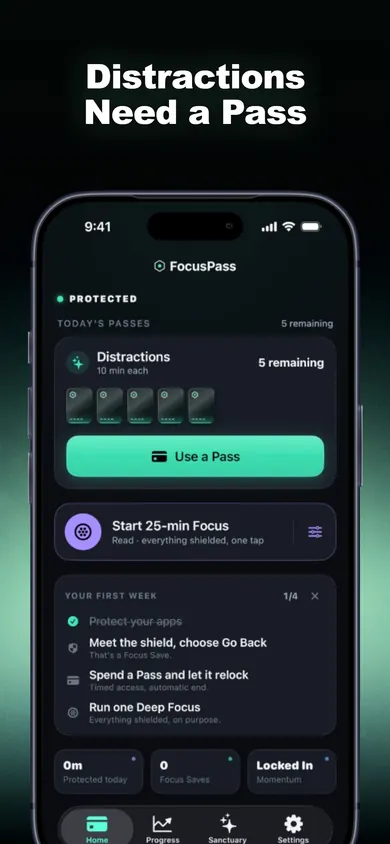
Passes, not a wall
You set a daily number of Passes for a group of apps (a Wallet). The free plan includes one Wallet. Opening a protected app shows a native shield that says PROTECTED, with Go Back or Use a Pass.
Every Go Back is recorded as one Focus Save, with no invented minutes.
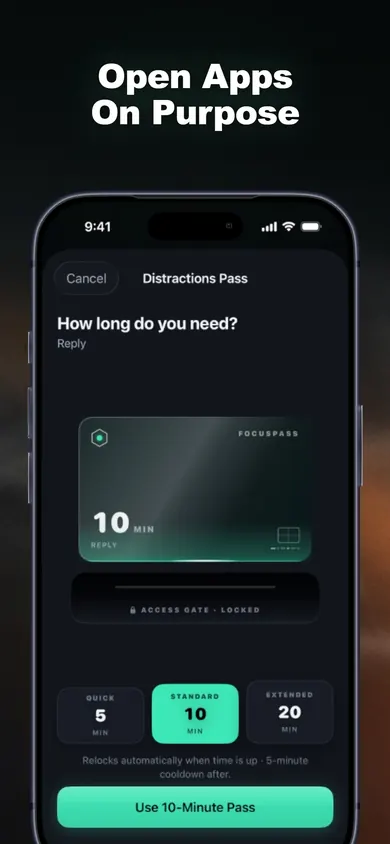
Choose the minutes first
Pick a length, for example 5, 10 or 15 minutes, plus an optional reason like Reply, Post or Research. The relock is scheduled with iOS before the app opens, so it locks again even if FocusPass is closed.
This is the gap between one sec's pause and Opal's wall: you get in, on a timer you chose.
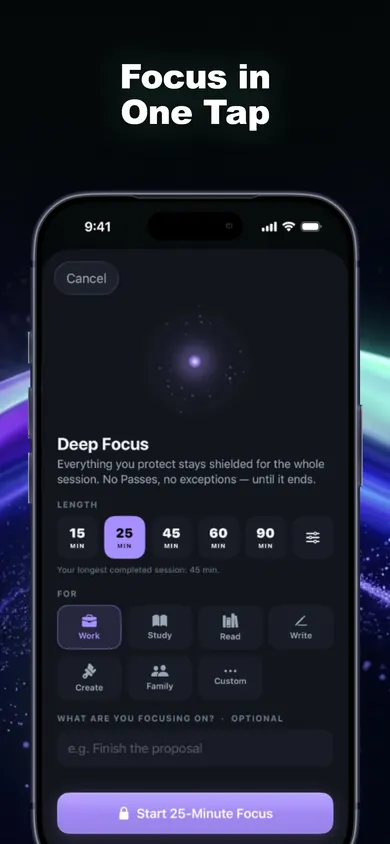
Fixed blocks when you need them
Start a 25, 45, 60 or 90-minute session from Home, Siri, Apple Watch or a widget. Protected apps stay shielded and the timer shows in the Dynamic Island. Focus Rescue gives one short exit per session for something truly essential. The free plan includes one Deep Focus session a day.
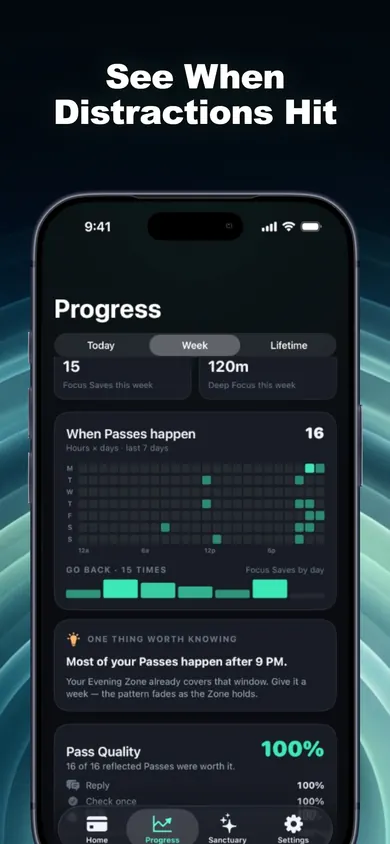
See when you slip
A Pass heatmap shows when you reach for your apps. With enough data, FocusPass points out one pattern, such as most Passes happening after 9 PM, and offers a fix you control, like an Evening Focus Zone. It's all calculated on your device.
Honest limits of all three
One sec
The pause is the whole idea, so a determined thumb gets through. Its listing describes Re-Intervention, which removes you after a set time (for example 5 minutes) so you must pause again. Its research is real: a 2023 study in PNAS (280 people, 6 weeks) found people closed the target app 36% of the time after the pause. One of the authors created one sec, and the paper discloses that.
Opal
Strong walls, more moving parts. The listing includes leaderboards, Focus Score, rewards and calendar routines. If you want only a lock, that's extra. Its paid plans are the priciest of the three on the US store, and it needs iOS 18 or later.
FocusPass (ours)
We made one design decision some people won't like: Turn Off All Protection always works and is never locked behind a purchase or streak. That makes FocusPass weaker than Opal's Deep Focus for anyone who needs a lock they cannot undo. It also needs iOS 18, and if a parent or organization manages Screen Time, their settings come first.
Every blocker trades strength for flexibility. Decide which one you need more.
One sec vs Opal vs FocusPass, side by side
| From the listing | one sec | Opal | FocusPass (ours) |
|---|---|---|---|
| How it stops you | Deep-breath pause before the app opens | Blocks on schedules, limits and sessions | Shield with Go Back or a timed Pass |
| Can't-cancel mode | Not described | Deep Focus: no cancel or bypass | No. Turn Off All Protection always works |
| Free plan | One app free | Free download, paid plans | Shields, Passes, relock, 1 Wallet, 1 Focus Zone, 1 Deep Focus a day |
| US paid prices | $6.99/mo, $19.99/yr, lifetime options | $4.99/wk to $99.99/yr | Pro monthly or yearly; price shown in app |
| Websites | Free Safari extension | Apps and websites | Apps, categories and websites |
| Social features | None listed | Leaderboards, shareable milestones | None. No account |
| Minimum iOS | 15.0 | 18.0 | 18.0 |
Source: each app's US App Store listing and in-app purchase list, checked 3 November 2026. Prices change; check the listing before you buy.
If price decides it, one sec is the cheapest paid plan. If strength decides it, Opal.
Who should pick something else
Skip all three if...
- You're blocking for a child. Use Apple's own parental controls, managed with Screen Time and a passcode.
- You only want a daily cap. Apple's built-in App Limits do that for free, with no new app.
- You want a lock you truly can't undo. Choose Opal's Deep Focus, not FocusPass.
- You're on Android. FocusPass is iPhone and iPad only, so check the other two apps' own sites.
The best blocker is the one you won't switch off on day three.
Not a pause. Not a wall.A Pass.
Open FocusPass in the App Store. Free on iPhone and iPad, iOS 18 or later.
More from Focus and Screen Time
- App blocker for kids vs adults: who holds the keyApp blocker for kids vs adults: who holds the key changes everything. Three taps walk a decision chart to Screen Time, a parental app or a self-blocker.
- Your first week off social media, day by dayTap each day to see what the first week of a social media detox feels like, plus one setup per day. For people who still need to post for work.
- Block apps during work hours, in 5 workdaysBlock apps during work hours on iPhone without losing Slack or your calendar. Sort your apps in 20 seconds, then follow a 5-workday plan to set it up.
- Block apps while studying: a finals plannerPick your exam date, study hours and hardest time of day. Get a finals-week plan of blocked study sessions for your iPhone, with honest limits.