Focus and Screen TimeUpdated November 2026
First-week guide

What Happens in Week OneOff Social Media?

For people who still post for work. Tap the shield the way you will on day one.

PROTECTED

You chose to protect this app.

Download on the App StoreFree on iPhone
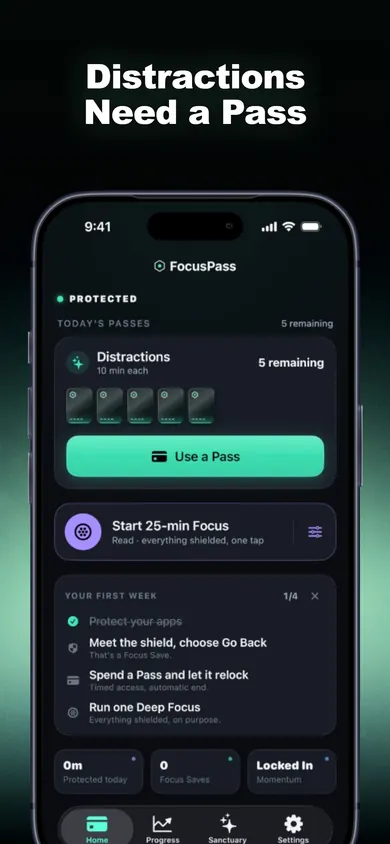
FocusPass home screen showing today's Passes and a Use a Pass button

Your 7-day detox planner

Tap a day. Each one shows what to watch for and one thing to set up. Days you have opened get a dot.

What happens in the first week off social media?

In the best-known trial, people who stopped social media for one week reported better wellbeing and less depression and anxiety than people who carried on. The University of Bath study (published May 2022 in Cyberpsychology, Behavior, and Social Networking) randomly split 154 adults aged 18 to 72. The break group went from about 8 hours a week to an average of 21 minutes during the break. The authors call it a short-term result and planned longer follow-ups (trial abstract on PubMed).

One week is short enough to finish and long enough to notice.

Why most social media detox plans fail by day three

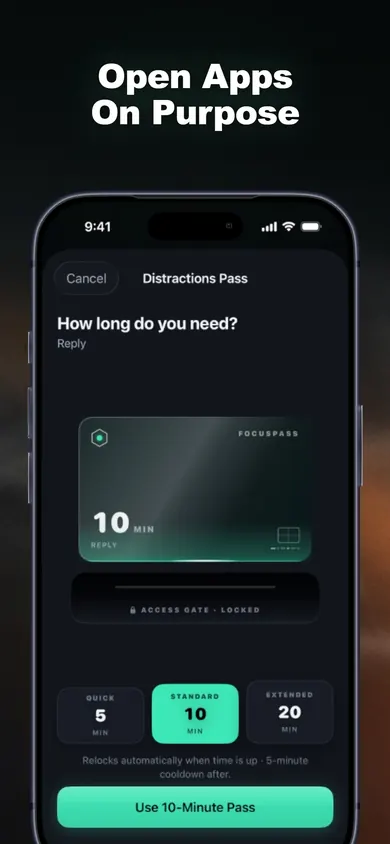
Total bans break the first time you genuinely need the app: a client message, a post you promised, a group chat for school pickup. That is why the planner above never says "delete everything". It says decide before you open. FocusPass puts that decision on a native shield with two buttons. Go Back returns you to what you were doing and records one Focus Save. Use a Pass gives you 5, 10 or 15 minutes with an optional reason such as Reply or Post, then the app locks again on its own.

The goal for week one is fewer automatic opens, not zero opens.

How to do a social media detox when you need it for work

  • Name the job. Use the Pass reason as a note to yourself: Post, Reply, Research.
  • Batch it. One Focus Zone (Work, Study, Evening or Sleep) is included free, so protected hours run without you remembering.
  • Keep the essentials. Apps you must always reach can be set as Essentials so they stay available.

This is general information, not medical advice. If low mood or anxiety is affecting your days, talk to your clinician.

Real screens

What your first week looks like in FocusPass

Home screen with today's Passes remaining and a first-week checklist
Passes left today, at a glance
Pass length picker with 5, 10 and 20 minute options
Pick a length, then it relocks
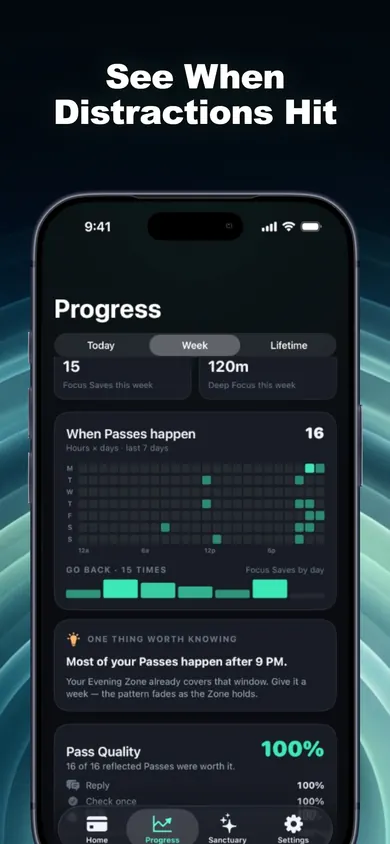
Progress screen with a heatmap of when Passes happen
The heatmap shows when you reach
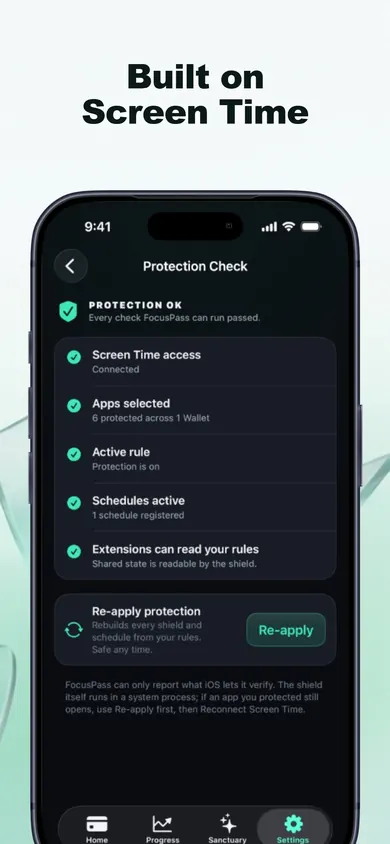
Protection Check screen listing what is working
Protection Check explains what is on
Honest limits

What FocusPass will not do in week one

We made one deliberate choice that some people will not like: Turn Off All Protection always works, and it is never locked behind a purchase or a streak. FocusPass is a speed bump you chose, not a cage. If you want a lock you truly cannot undo, pick a different tool.

It doesIt does not
Count each Go Back as one Focus SaveInvent "minutes saved" or guess what you did next
Relock on schedule even if FocusPass is closedOverride a parent's or organization's Screen Time settings
Show 7-day insights on the free planKeep full history unless you choose Pro
Run on iPhone and iPad with iOS 18 or laterBlock on Apple Watch (the Watch app shows status only)

Who should pick something else: anyone who needs a parent-controlled lock (use Apple's Screen Time with a passcode), anyone on iOS 17 or earlier, and anyone who would rather delete the apps outright for seven days. Deleting is free and works.

A blocker you can always switch off only works if you mean it, so we say so up front.

A worked example

A first week for someone who posts for a small business

Here is how we would set up the week for a hypothetical bakery owner who has to post every afternoon and answer messages, but loses evenings to the feed.

  1. Day 1: Protect Instagram, TikTok and Facebook with Apple's Screen Time picker. Leave the bakery's ordering app as an Essential.
  2. Day 2: One Wallet for the three apps. Posting gets a 15-minute Pass with the reason "Post".
  3. Day 3: An Evening Focus Zone from 8 PM, because that is when scrolling stretches.
  4. Days 4–7: Every Go Back counts. By Sunday the Weekly Review shows Focus Saves by day, calculated on the phone.

Work posts still go out. The drifting stops getting a free pass.

Setup

How to block social media apps on iPhone in 3 steps

  1. Choose what to protect. Pick apps, whole categories or websites with Apple's own Screen Time picker. Apple keeps your selections opaque, even to FocusPass.
  2. Meet the shield. Open a protected app. You will see PROTECTED with Go Back or Use a Pass. Try both once on purpose.
  3. Let it relock. Spend a Pass and watch it end. The relock is scheduled with iOS before the app opens, so it happens even if FocusPass is closed.

Three taps of setup, then the shield does the remembering.

Social media detox questions

How long should a social media detox last?
One week is a practical first target. It is the length used in the 2022 University of Bath trial, and it is short enough that most people can plan around it.
Can I do a social media detox if I need to post for work?
Yes. Instead of a total ban, protect the apps and give yourself short, named Passes for posting and replies. FocusPass relocks the app when each Pass ends.
Is FocusPass free?
Yes. The free plan includes native shields, Go Back and Focus Saves, timed Passes, automatic relocking, one Wallet, one Focus Zone, one Deep Focus session a day and 7-day insights. FocusPass Pro is an optional subscription.
Does FocusPass need an account?
No. There is no account, no ads and no analytics SDKs. Your rules and history stay on your device.
Seven days

Decide before you open. Every time.

Make it a habit with FocusPass. Free on iPhone and iPad, iOS 18 or later.

Download on the App StoreFree on iPhone

More from Focus and Screen Time