Dump everything, sort nothing
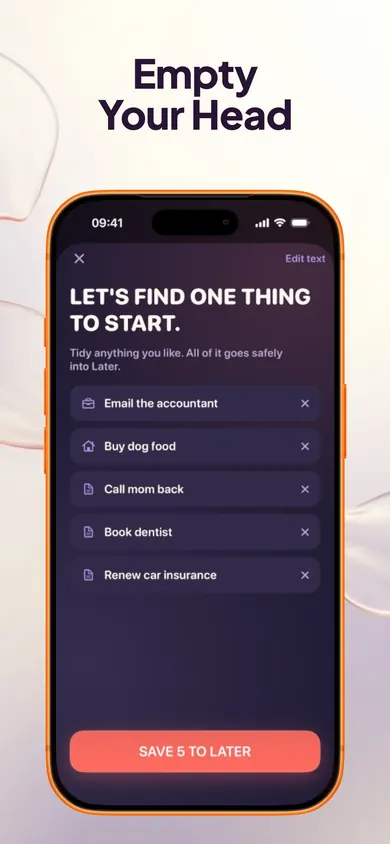
Set a timer for 5 minutes in the evening. Write every task, worry and errand, in any order. Type yours below and we'll split it into tasks and load the sorter at the top of this page.
For adults with ADHD whose to-do list runs at night. Drag three into today.
Tap or drag a task into today.
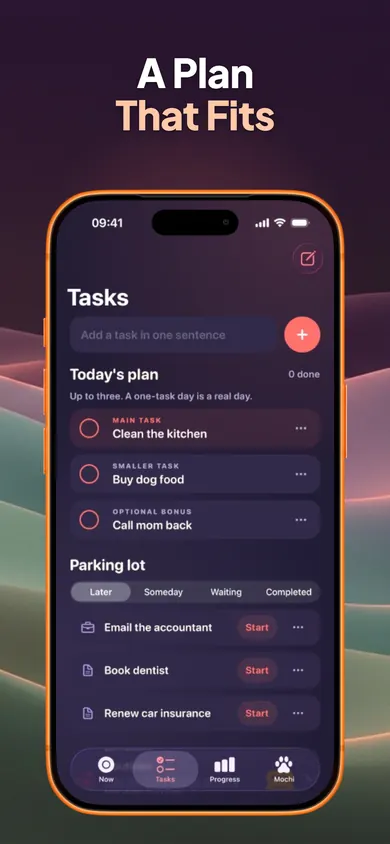
Write down everything on your mind in one place, without sorting as you go. Then choose at most three things for today: one main task, one smaller one and an optional bonus. Everything else goes into a parking lot, so it is kept, not forgotten. Finally, start the main task for just two minutes.
The dump is for getting it out. The three slots are for getting going.
The research behind this is encouraging but specific. In a 2011 set of studies in the Journal of Personality and Social Psychology, Masicampo and Baumeister found that making a specific plan for an unfinished goal stopped it from intruding on other work. And a small 2018 sleep-lab study at Baylor University (57 young adults) found people who spent 5 minutes writing a specific to-do list at bedtime fell asleep faster than people who wrote about what they had already done. Neither study was about ADHD, so treat them as a reason to try, not a promise.
This is general information, not medical advice. Talk to your clinician. Now is a productivity-support tool; it does not diagnose, treat or manage ADHD.
Set a timer for 5 minutes in the evening. Write every task, worry and errand, in any order. Type yours below and we'll split it into tasks and load the sorter at the top of this page.
Pick one main task, one smaller task and an optional bonus. If a day only has one, that's a real day.
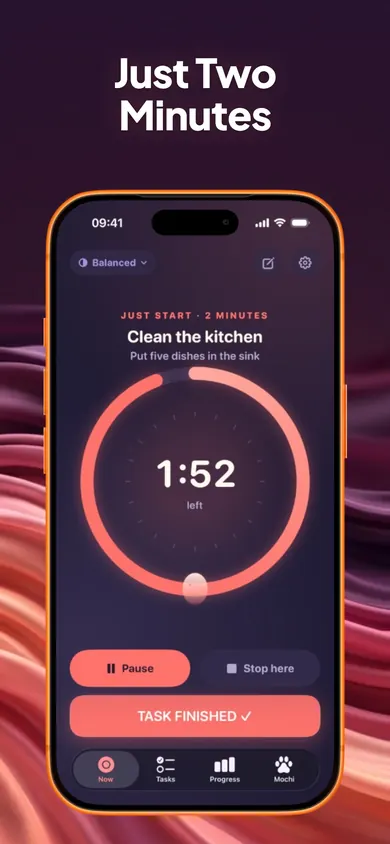
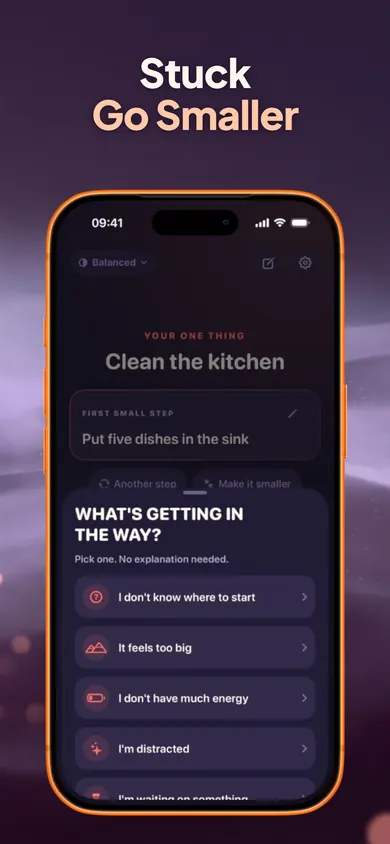
Shrink it to a first step you could do now ("put five dishes in the sink", not "clean the kitchen"). Start a two-minute timer. Stopping at two still counts.
Too big? Split it into 2 to 5 steps. Low energy? Pick the tiniest version. Waiting on someone? Park it under Waiting and choose another.
Sort the rest into Later, Someday or Waiting. Don't carry unfinished tasks onto tomorrow's three by default.
How long did the main task take compared with what you expected? Note it once. Over a week, the gap tells you how big to make your three.
Keep the dump at the time of day that worked. Drop any step that felt like homework. A habit you keep beats a system you abandon.
Seven short evenings. By the end, the dump is a reflex, not a project.
Paper is a fine answer. The point is the three slots, wherever they live.
Here's a hypothetical evening. The lights are off, and a list starts running: the landlord email, the dentist, the parcel, a birthday card, the bike light, a work slide.
Instead of rehearsing it until 1 AM, the phone comes out for three minutes. Brain Dump takes the lot (typed, or dictated with the keyboard microphone) and splits it into six tasks. The landlord email becomes tomorrow's main task, the parcel the smaller one, the card the bonus. The other three go to Later. Phone down.
Wednesday at 9: the Now screen shows one task, one first step ("open the email draft") and a start button. Two minutes. Then, usually, a few more.
The list didn't get shorter. It just stopped living in your head.
One honest limit: we chose to cap the daily plan at three, on purpose, and some people will find that too tight on a big day. The rest is still one tap away in the parking lot. Who should pick something else: anyone who needs a full project manager with shared lists or deadlines, and anyone on Android. Now is iPhone only. If you're still working out whether ADHD fits, the NIMH's ADHD overview is a careful place to start.
Download free on the App Store. No account, and your tasks stay on your iPhone.