How do you get unstuck from task paralysis?
Pause first, then shrink the task until the first step is almost silly, and start it for just two minutes with a visible timer. Task paralysis usually isn't laziness. It's a pile-up of vague goals, too many choices and worry about doing it well, so the fix is to make starting smaller than the worry.
That's the summary from two sources we trust. On NewYork-Presbyterian's Health Matters podcast (23 September 2026), psychologist Dr. Alyssa Ames-Sikora describes task paralysis as an umbrella over procrastination, avoidance, perfectionism and decision paralysis, with anxiety often at the root, and recommends beginning with the smallest possible step. And in Psyche's guide, psychotherapist Joe Wilner adapts goal management training, a method first developed by Ian Robertson for people recovering from brain injury, into four stages. Those stages are the guide below.
Make starting smaller than the worry about starting.
Your two-minute start
You scratched a first move above. Now give it a clock. Tap start, do only that, and stop when the ring closes if you want to. Ending early still counts.
Put five dishes in the sink.
Task paralysis, step by step
Four illustrated stages, adapted from goal management training as Psyche describes it. Each one takes under a minute.
- Step 1
Stop and breathe out
Before you plan, take three slow exhales. Stress narrows attention, so a short pause with a built-in end comes first.
- Step 2
Say the goal out loud
One sentence: "I'm cleaning the kitchen." Saying it keeps the goal from fading when your mind wanders, which Wilner calls rehearsing it.
- Step 3
Shrink it to the smallest step
Not "clean the kitchen" but "put five dishes in the sink". If that's still too big, make it smaller again. Stopping there is allowed.
- Step 4
Start, then check
Run a visible two-minute timer. When it ends, ask: am I doing what I meant to? Keep going, name the next small step, or stop.
Stop. Say it. Shrink it. Start it. Then check.
Three ways to start, compared
| Method | How long | Best when | Watch out for |
|---|---|---|---|
| Two-minute start | 2 minutes, then decide | You can't begin at all | A first step that's still too big |
| Pomodoro | 25 minutes on, 5 off, a longer break after four rounds | You've started and need to keep going | 25 minutes can feel huge when you're frozen |
| Body doubling | As long as the other person stays | Company helps you stay put | Needs another person or a video call |
Pomodoro timing as described on NewYork-Presbyterian's Health Matters (September 2026); body doubling as described in Psyche's guide.
Task paralysis questions
Is task paralysis the same as procrastination?
They overlap. Procrastination is putting something off; task paralysis is the stuck feeling of not being able to begin, even when you want to. Anxiety, vague goals, too many choices and perfectionism can all feed it.
Is task paralysis an ADHD thing?
Many people with ADHD describe it, but anyone can freeze in front of a task. You don't need a diagnosis to use these steps. If it's affecting work, school or daily life, talk to your clinician.
Why does a two-minute start help?
It turns a big, vague job into one concrete action with an end in sight. Once you've started, continuing is often easier, and if it isn't, two minutes still counts as progress.
What if I freeze again halfway through?
Go back to step 1. Pause, name the goal again, and pick the next smallest step. Getting stuck twice is normal, not failure.
Who should pick something else
- If you're stuck most days and it's getting worse, a clinician is a better next step than any app. This is general information, not medical advice.
- If you already know where to start and just need to keep going, a plain focus timer may be all you need.
- If you need a detailed project plan, Now deliberately isn't one. Its daily plan holds up to three tasks.
- If you're on Android, Now is iPhone only.
Honest limit: Now is a productivity-support tool. It does not diagnose, treat or manage ADHD or any medical condition.
What getting unstuck looks like in Now
How Now gets you unstuck, in 3 steps
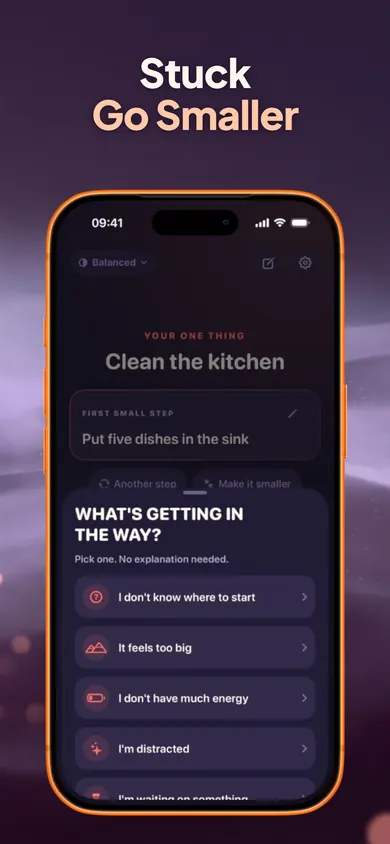
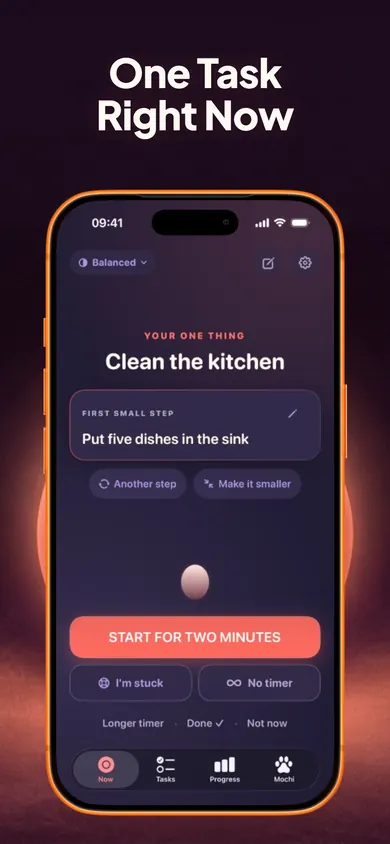
- Type the task. Now suggests one concrete first step, like "Put five dishes in the sink" for "Clean the kitchen". Edit it, choose another, or make it smaller.
- Tap "I'm stuck" if you are. Pick what's in the way: don't know where to start, too big, low energy, distracted, waiting on something, or need a break. Each answer gives one practical next move, such as 2 to 5 editable steps or the tiniest version of the task.
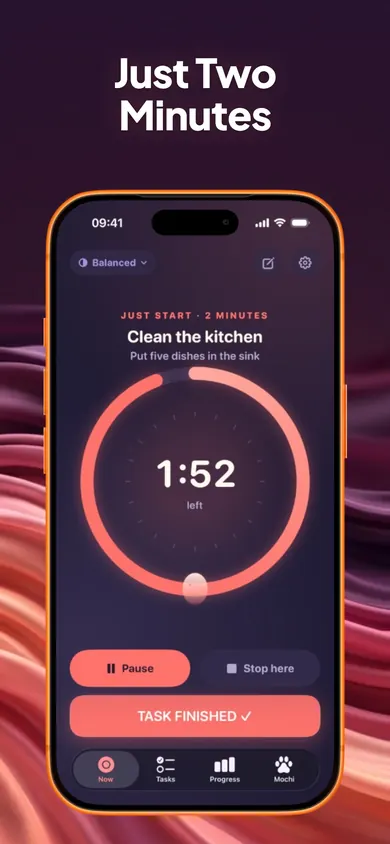
- Start two minutes. A visual ring counts down. Pause, stop early or keep going with 5, 10, 15 or 25 minutes. Timers keep correct time even when your phone is locked.
We designed the Now screen to show one task, not a list, because a list is often where the freezing starts. The rest waits in a private parking lot.
Stuck? Go smaller.Then start for two minutes.
Start on your iPhone. Free, no account, and your tasks stay on your phone.
More from Focus and Screen Time
- ADHD task initiation in adults, answeredWhy starting is so hard with ADHD, answered plainly for adults diagnosed later in life. Flip three myths, then get one next move for what's in the way.
- An ADHD morning routine for working from homeAn ADHD morning routine for working from home, built back from your log-on time. A 10-workday challenge, one change a day, with a first hour you can print.
- Can you body double by yourself?Can you body double by yourself? Partly. Rebuild 2 of its 3 ingredients alone, see what the thin research says, and build a solo setup for tonight.
- How to do a brain dump with ADHDHow to do a brain dump with ADHD, one day at a time for a week. Drag your own list into three slots for today. Nothing else gets lost.