How much screen time is reasonable over the holidays?
There is no official number for adults. A reasonable holiday budget is one you choose before the break starts: a normal daily allowance, a few planned bigger days for travel or films, and a rule that a bigger day costs you something tomorrow. Planned extra time is fine. Unplanned extra time is what tends to swallow a break.
For context, the U.S. Bureau of Labor Statistics' American Time Use Survey, released June 25, 2026, found people spent 2.6 hours a day watching TV in 2025, about half of all leisure time, and 37 minutes a day playing games or using a computer for leisure, up from 25 minutes in 2015. Holidays add free hours, and screens fill free hours first.
You don't need a screen-free holiday. You need a budget you set before it starts.
Holiday screen time planner
Set your normal allowance for distracting apps, then mark how many days get extra. Each extra is paid back the next day, and no day drops below your floor.
NormalBigger dayPay-back day
Bigger days are allowed; they just come with a smaller tomorrow.
How to set this up in three steps
- Choose the apps that eat your break. Pick distracting apps, categories and websites with Apple's private picker. On iPhone, Apple's built-in Screen Time can also set app limits and Downtime if you want to start there.
- Set the allowance from the planner. Time Debt supports different weekday and weekend limits, which is a decent stand-in for workdays and days off.
- Borrow on purpose. On a bigger day, pick 5, 10 or 15 minutes or a custom amount within your cap. Time Debt shows today, tomorrow's normal allowance and tomorrow's adjusted allowance side by side before you confirm.
Set it before the break, and the break runs itself.
A December 26 in two versions
Version one. Everyone is asleep on the sofa. You pick up your phone "for a second." The Screen Time prompt appears, you tap past it, and then again. It is dark when you look up.
Version two. Same sofa. The limit lands, and the shield covers the apps. You borrow 15 minutes and see that tomorrow starts 15 minutes shorter. You use ten, end the session early, and the unused five come back.
Same person, same phone. The difference is that version two had a price you could see.
A visible cost does more than a stern rule.
Honest limits
- It only works if you let it. Time Debt is a voluntary commitment tool, not treatment. On your own iPhone, Screen Time permission can be withdrawn in Settings, and emergency access removes every shield until tomorrow at no cost.
- One design decision: repayment happens once, the next day, with no interest. We kept it simple on purpose, so the free plan does not spread one big day across a week. Multi-day repayment is part of Time Debt Pro.
- The planner is an estimate. It assumes one borrow per bigger day and repayment the next day, which is how the free plan works. Real days are messier.
- Who should pick something else: anyone who wants a hard block with no way out, or a parent who needs remote monitoring. Time Debt's family tools work on a shared or handed-over iPhone, with no remote monitoring.
Real screens, marked up
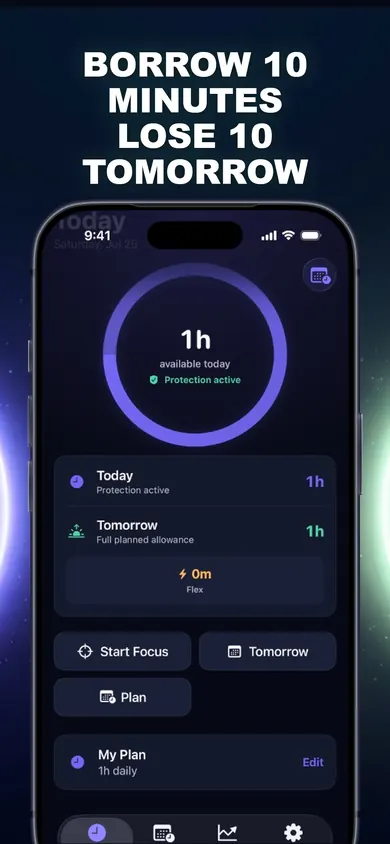
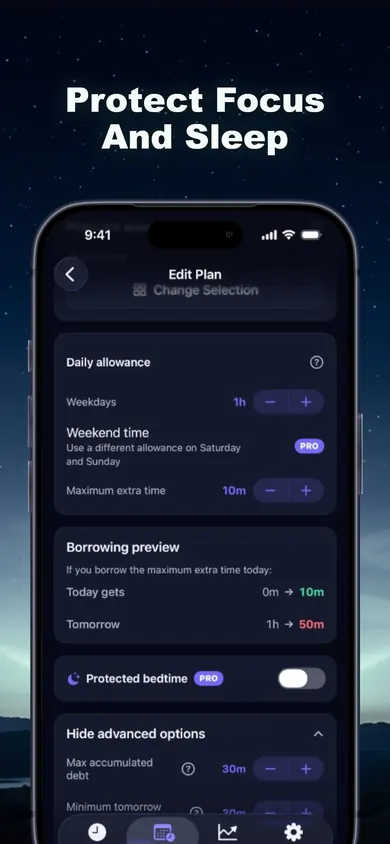
You see the cost before you confirm, every time.